Expression Pedal
An expression pedal sends a continuous control signal, so you can change a parameter smoothly with your foot while you play, for example the position of a wah or the level of a volume effect. XR1 has two inputs for expression pedals and footswitches: EXP 1 and EXP 2.
Supported Pedal Types
- TRS expression pedal
- TRS expression pedal with a switch
- Single footswitch
- Dual footswitch
Connect an Expression Pedal
- Connect the pedal to EXP 1 or EXP 2 with a TRS cable.
- Check the pedal's own manual for its wiring. Single TRS, dual TRS, and Y-cable connections are supported.
Calibrate an Expression Pedal
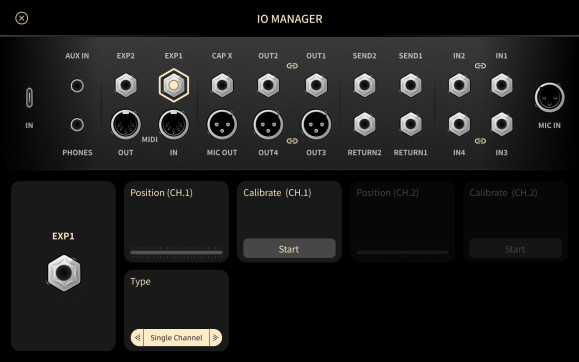
- Open Global I/O.
- Tap the input you connected the pedal to, EXP 1 or EXP 2.
- Tap Calibrate.
- Move the pedal all the way from heel to toe. XR1 measures the lowest and highest positions.
- Tap Save.
If you use a dual-channel pedal or more than one pedal, calibrate each one separately.
Assign an Expression Pedal
-
On the parameter screen of an effect, tap More > Expression Pedal.
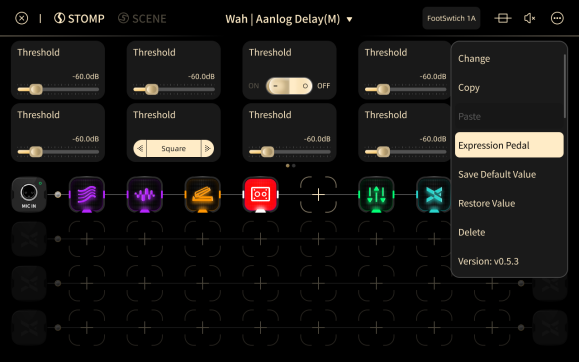
-
Select the parameter you want to control, then set how the pedal position maps to the parameter value.
Continuous Parameters
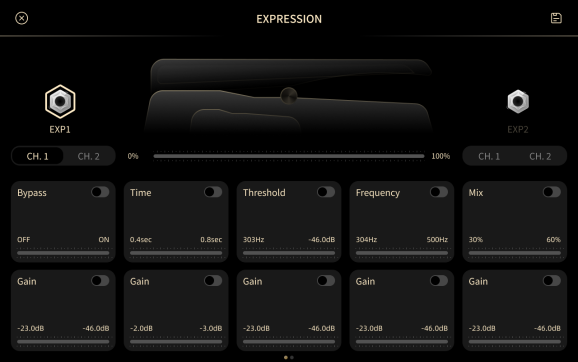
- Minimum: the pedal position at which the parameter reaches its minimum value. The default is 0%.
- Maximum: the pedal position at which the parameter reaches its maximum value. The default is 100%.
On/Off Parameters
- Minimum: when the pedal is below this position, the effect is bypassed. The default is 0%.
- Maximum: when the pedal is above this position, the effect is active. The default is 100%.