Global I/O
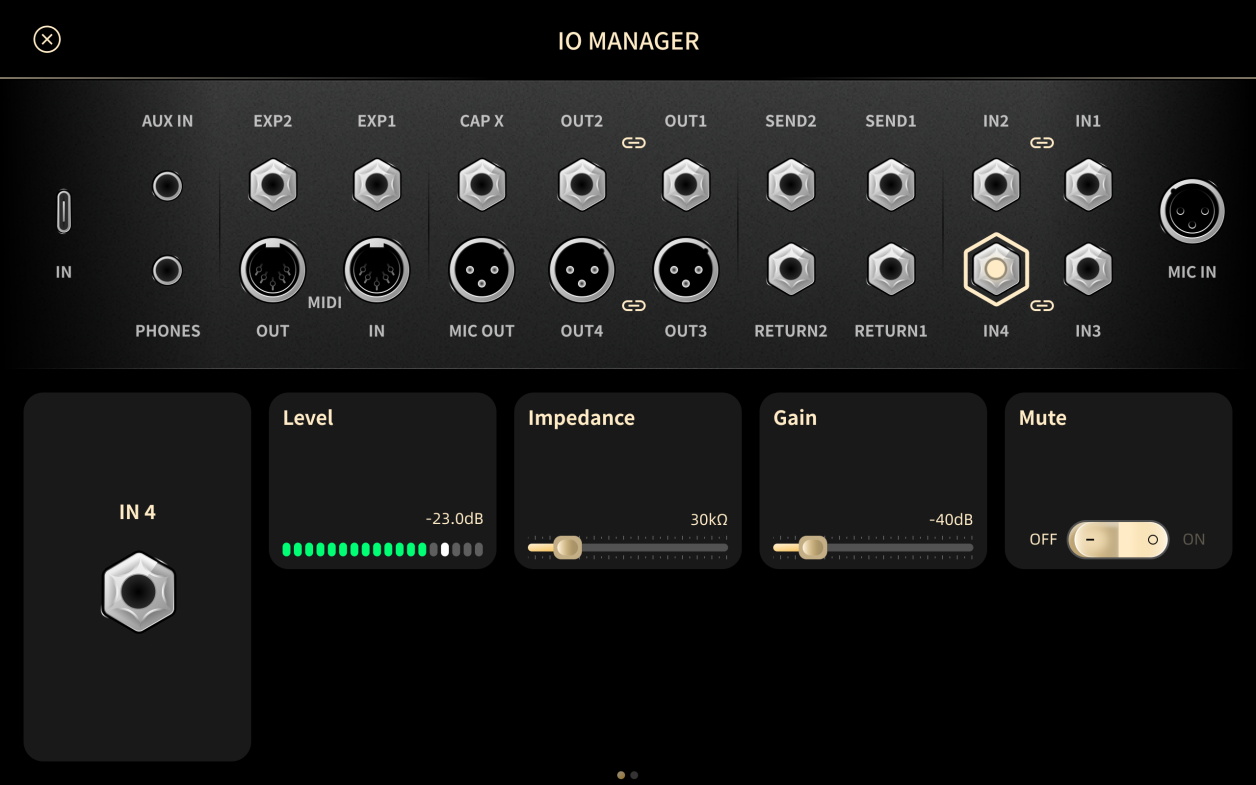
Global I/O shows every input and output on XR1. Tap a jack to see its level and change its settings. These settings apply to all Presets.
The numbers below match the callouts in the figure above. For connector types, levels, and impedances, see I/O Specifications.
-
INPUT 1–4
- Gain: −60 dB to +12 dB.
- Impedance: 10 kΩ to 10 MΩ. The default is 1 MΩ.
- Level: shows the input level of the selected jack.
- INPUT 1/2 and INPUT 3/4 can each be paired as a stereo input. Tap between the two jacks to select and adjust both channels together.
-
MIC IN
- Phantom 48 V: turns +48 V phantom power on or off.
- Preamp: +15 dB, +25 dB, or +55 dB.
- Level: shows the MIC IN level.
-
RETURN 1/2
- Gain: −60 dB to +12 dB.
- Impedance: 1 MΩ.
- Level: shows the input level of the selected RETURN jack.
-
EXP 1 / EXP 2
- Position: shows the calibrated minimum and maximum, from 0 to 1.
- Calibrate: tap to measure the lowest and highest positions of the pedal.
- Save: tap to store the calibration.
- See Expression Pedal.
-
OUT 1/2
- Gain: −60 dB to +12 dB.
- Level: shows the output level of the selected jack.
- Mute: mutes the selected output.
- Tap between the two jacks to pair them as a stereo output.
-
MIC OUT
- Gain: −60 dB to +12 dB.
- Level: shows the MIC OUT level.
- Mute: mutes MIC OUT.
-
OUT 3/4
- Gain: −60 dB to +12 dB.
- Level: shows the output level of the selected jack.
- Mute: mutes the selected output.
- Tap between the two jacks to pair them as a stereo output.
-
SEND 1/2
- Gain: −60 dB to +12 dB.
- Level: shows the SEND level.
-
PHONES
- Gain: −60 dB to +12 dB.
- Level: shows the headphone level. The headphone signal is taken after the Signal Chain.
-
USB
- Input gain: −60 dB to +12 dB.
- Output gain: −60 dB to +12 dB.
- Input level: USB IN 1/2, 3/4, 5/6, and 7/8.
- Output level: USB OUT 1/2, 3/4, 5/6, and 7/8.
- See USB Routing.
-
MIDI IN / MIDI OUT
- MIDI THRU: when on, messages received at MIDI IN are forwarded to MIDI OUT.
-
AUX IN
- Gain: −60 dB to +12 dB.
- Level: shows the AUX IN level.
-
CapX Output
- The dedicated output used for tone capture. See CapX.