MIDI
XR1 can control other MIDI devices (MIDI Out) and can be controlled by them (MIDI In). MIDI is available on the 5-pin MIDI IN and MIDI OUT jacks and over USB. For the global MIDI channel, USB MIDI, and MIDI THRU, see Settings.
MIDI Out
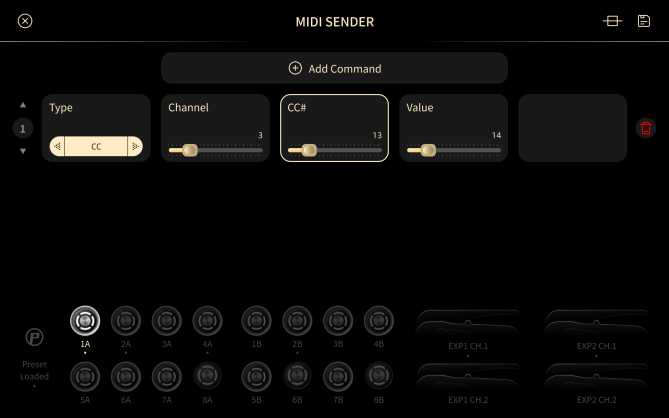
On the Signal Chain screen, tap More > MIDI Out to open the MIDI output settings.
Message Sources
XR1 can send MIDI messages from four sources:
- Footswitch: each footswitch can send up to 12 MIDI messages.
- Expression pedal: each EXP input can send one Control Change (CC) message.
- Dual footswitch connected to an EXP input: each of the two switches can send one CC message.
- Preset load: loading a Preset can send up to 12 MIDI messages.
Message Types
| Message | Parameters |
|---|---|
| Control Change (CC) | MIDI channel: 1–16. CC number: 0–127. Value: 0–127. |
| CC Toggle | MIDI channel: 1–16. CC number: 0–127. Minimum value: 0–127. Maximum value: 0–127. |
| Program Change (PC) | MIDI channel: 1–16. Bank Select MSB (CC#0): 0–127. Bank Select LSB (CC#32): 0–127. Program number: 0–127. |
MIDI In
To control XR1 from an external MIDI device, send the Control Change messages below.
Presets
| Message | Value | Action |
|---|---|---|
| CC#0 | 0–127 | Sets the Preset Start Value to Value × 16. |
| CC#32 | 0–127 | Switches to the Preset numbered Preset Start Value + Value. |
Send CC#0 first, then CC#32. Each Patch holds 16 Presets, so each step of CC#0 moves the start value by one Patch.
Expression Pedals and Footswitches
| Message | Value | Action |
|---|---|---|
| CC#1 | 0–127 | Expression pedal 1, channel 1. Mapped to a position of 0–100. |
| CC#2 | 0–127 | Expression pedal 1, channel 2. Mapped to a position of 0–100. |
| CC#3 | 0–127 | Expression pedal 2, channel 1. Mapped to a position of 0–100. |
| CC#4 | 0–127 | Expression pedal 2, channel 2. Mapped to a position of 0–100. |
| CC#31 | 0–7 | Presses footswitch 1–8. Value 0 is footswitch 1. |
| CC#31 | 8 | Presses footswitch 9 (PAGE/LIVE). |
| CC#31 | 9 | Presses footswitch 10 (TEMPO/TUNER). |
Scenes and Modes
| Message | Value | Action |
|---|---|---|
| CC#30 | 0–7 | Selects Scene 1A–8A. |
| CC#30 | 8–15 | Selects Scene 1B–8B. |
| CC#46 | 0 | Switches to Preset mode. |
| CC#46 | 1 | Switches to Scene mode. |
| CC#46 | 2 | Switches to Stomp mode. |
| CC#46 | 3 | Switches to Combo mode. |
Tempo
| Message | Value | Action |
|---|---|---|
| CC#44 | 0, 1, or 2 | Sets the BPM type to Global (0), Preset (1), or Scene (2). |
| CC#44 | 10–127 | Sets the BPM Start Value to Value + 30. |
| CC#45 | 0–127 | Sets the tempo to BPM Start Value + Value. |
For example, to set 120 BPM, send CC#44 with value 10 (BPM Start Value = 40), then CC#45 with value 80.
Looper
| Message | Value | Action |
|---|---|---|
| CC#47 | Any | Opens or closes the Looper screen. |
| CC#48 | Any | Single Play on or off. |
| CC#49 | Any | Half Time on or off. |
| CC#50 | Any | REC / Overdub. |
| CC#52 | Any | Playback / Stop. |
| CC#54 | Any | Delete. |
| CC#55 | 0–7 | Plays Loop File 1–8. |
| CC#56 | 0–7 | Stops Loop File 1–8. |
| CC#57 | Any | Doubler. |
| CC#58 | Any | Cut. |
| CC#59 | Any | Short Cut: starts or stops replacing. |
For what each Looper control does, see Looper.